Best Plotter Printer 2026 - Reviews with Buying Guide and FAQs
by David Fox
The global wide-format printer market hit $8.4 billion in 2025 and is projected to surpass $11 billion by 2030 — a clear sign that architects, engineers, and creative professionals are investing more than ever in large-format output. Whether you're printing CAD drawings, construction blueprints, GIS maps, or oversized posters, a dedicated plotter printer delivers the precision and scale that standard desktop printers simply cannot match.
But choosing the right plotter printer in 2026 is harder than it sounds. Print widths range from 24 to 44 inches. Ink systems vary from 4-color dye to 9-color pigment. Some models fit on a desktop while others need their own corner of the office. Price points stretch from under $1,000 to well over $5,000, and the ongoing ink costs can dwarf the purchase price within a year. You need to match the machine to your actual workflow — not just the spec sheet.
We've tested and compared seven of the best plotter printers available right now, covering everything from compact 24-inch desktop units to professional 44-inch production machines. Each review below breaks down real-world performance, build quality, ink costs, and ideal use cases so you can make a confident decision. If you're also setting up a full creative workstation, our guide to the best monitors for photo editing under $200 pairs well with a plotter setup for color-accurate proofing on screen before you commit to a large-format print.
Contents
Our Top Picks for 2026
- #PreviewProductRating
- Bestseller No. 1
 Rating:

- Bestseller No. 2
 Rating:
 - Bestseller No. 3
 Rating:
 - Bestseller No. 4
 Rating:
 - Bestseller No. 5
 Rating:
 - Bestseller No. 6
 Rating:
 - Bestseller No. 7
 Rating:
In-Depth Reviews
1. HP DesignJet T210 Large Format 24-Inch Color Plotter Printer — Best Budget Entry Point
The HP DesignJet T210 is where most people should start if they've never owned a plotter printer before. It handles media rolls up to 24 inches wide and accepts sheets up to 13×19 inches through an optional automatic sheet feeder. For technical line drawings, CAD plans, sewing patterns, and basic poster work, it delivers clean, accurate output at a price point that won't wreck your budget. The thermal inkjet printhead produces crisp text and precise lines — exactly what you need for architectural elevations or engineering schematics.
Setup is straightforward. HP's software ecosystem is mature, with solid driver support across Windows and macOS. The built-in automatic horizontal cutter trims roll media cleanly, saving you the hassle of manual cutting. Where the T210 falls short is speed. It's noticeably slower than the T230 and T650 on complex renders with heavy fill areas. Color accuracy is acceptable for presentations and posters but won't satisfy fine art or photography workflows. Think of this as a workhorse for line work and text-heavy documents, not a color-critical production machine.
For the price, the T210 punches above its weight. If your daily output is CAD drawings, maps, and the occasional poster, it handles those tasks reliably without the overhead of a more expensive machine. Just be aware that ink cartridge costs add up if you're doing high-volume color work.
Pros:
- Most affordable HP DesignJet in the current lineup
- Crisp line quality ideal for CAD, blueprints, and technical drawings
- Compact enough for small offices and home studios
- Automatic horizontal cutter included
Cons:
- Slower print speeds on color-heavy documents
- No warranty care pack included — sold separately
2. HP DesignJet T650 Large Format 36-Inch Plotter Printer — Best Overall for Professionals
The DesignJet T650 is HP's flagship in the mid-range plotter category, and it earns that position. With 36-inch roll support, a bundled automatic sheet feeder, and a 2-year onsite warranty included in the box, it removes most of the friction that comes with owning a large-format printer. Architects and engineers consistently rank this model among their top choices for a reason — it produces D-size and E-size prints with the kind of line precision that makes reviewers question whether they even need a more expensive machine.
Print speed is a meaningful step up from the T210 and T230. A standard D-size line drawing comes off the roll in under 30 seconds, and even complex renders with gradient fills complete in reasonable time. The included sheet feeder handles cut sheets up to 13×19 inches automatically, which is a genuine convenience if you alternate between roll and sheet media throughout the day. Wi-Fi and Ethernet connectivity are both onboard, and HP Smart app integration lets you monitor ink levels and queue jobs remotely.
The T650's biggest advantage is the warranty package. That 2-year onsite support with next-business-day service is worth hundreds of dollars on its own and provides real peace of mind for firms that depend on their plotter daily. If 36-inch output fits your workflow and you want a machine that balances performance, reliability, and support, the T650 is the one to beat in 2026. For professionals who also need a reliable way to print 11×17 architectural documents, having a tabloid printer alongside a plotter covers both quick reference prints and full-size plans.
Pros:
- 36-inch print width covers D-size and E-size formats
- 2-year onsite warranty with next-business-day service included
- Automatic sheet feeder included — no separate purchase needed
- Strong Wi-Fi and Ethernet connectivity with remote monitoring
Cons:
- Higher upfront cost than 24-inch models
- Footprint requires dedicated floor space
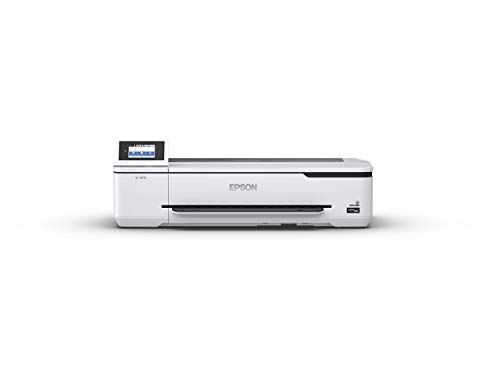
3. Epson SureColor T3170 24-Inch Desktop Wireless Plotter Printer — Best for Speed and Desktop Use
If speed is your top priority in a 24-inch plotter, the Epson SureColor T3170 is the clear winner. Its PrecisionCore printhead produces an accurate A1/D-size print in just 34 seconds — that's roughly twice as fast as comparable HP models in this size class. For firms cranking out dozens of drawings per day, that time savings compounds into hours recovered every week. The all-pigment ink system means prints resist water, smudging, and UV fading, making them suitable for job site conditions where dye-based prints would deteriorate.
Epson nailed the form factor here. The T3170 has an ultra-compact footprint that genuinely fits on a desk, which sounds like marketing speak until you see it next to an HP DesignJet. It's significantly smaller and lighter. The 4.3-inch color LCD touchscreen makes navigation intuitive — you can manage print queues, check ink levels, and configure media settings without touching your computer. Wireless connectivity works reliably, and Epson's driver ecosystem supports both Windows and macOS without the quirks that sometimes plague large-format printer drivers.
The trade-off is the 24-inch maximum width. If you need 36-inch output, the T3170 is simply out of the running. But for studios, small engineering firms, and creative professionals who primarily work at A1/D-size, this is the fastest and most space-efficient plotter you can buy. The pigment inks also make it a strong choice for poster prints and signage that need to survive outdoor exposure.
Pros:
- Blazing 34-second A1/D-size print speed
- All-pigment inks for water and fade resistance
- Truly compact desktop footprint — smallest in its class
- Intuitive 4.3-inch color touchscreen
Cons:
- Limited to 24-inch maximum print width
- Optional stand sold separately adds to total cost
4. HP DesignJet T230 Large Format 24-Inch Plotter Printer — Best Value with Warranty
The T230 sits in a sweet spot between the bare-bones T210 and the larger T650. You get the same 24-inch print width and core HP DesignJet technology, but with a 2-year onsite warranty care pack bundled in. That warranty alone justifies the price difference over the T210 for most buyers. If your plotter goes down during a deadline, next-business-day onsite service is the difference between a minor inconvenience and a catastrophe.
Performance-wise, the T230 handles technical line drawings, blueprints, indoor signage, sewing patterns, and maps with the precision you'd expect from HP's DesignJet line. The print quality on line work is essentially identical to the T210 — both use the same thermal inkjet technology. Where you benefit is in the support infrastructure. Remote troubleshooting, HP-certified parts, and onsite technician visits are all covered for two full years. For construction professionals and architects who bill by the hour, downtime has a real dollar cost, and the warranty coverage here directly addresses that risk.
The T230 accepts media rolls up to 24 inches wide and cut sheets up to 13×19 inches via an optional sheet feeder. Like the T210, it includes an automatic horizontal cutter. If you don't need 36-inch output and you want the security of included warranty coverage, the T230 represents the best value proposition in HP's 2026 plotter lineup.
Pros:
- 2-year onsite warranty included — best-in-class support for a 24-inch model
- Excellent line quality for CAD, blueprints, and technical documents
- Popular among architects, engineers, and construction professionals
- Same reliable HP DesignJet platform as higher-end models
Cons:
- Sheet feeder is optional — not included like the T650
- Print speeds lag behind the Epson T3170
5. Canon imagePROGRAF TM-300 36-Inch 5-Color Inkjet Plotter Printer — Best for Color Accuracy
Canon's imagePROGRAF TM-300 brings something the HP DesignJet lineup doesn't — a 5-color LUCIA TD pigment ink system. That fifth ink channel delivers noticeably richer color output, deeper blacks, and smoother gradients compared to 4-color thermal inkjet systems. If your work involves color-critical output like presentation renders, retail signage, or map printing where color differentiation matters, the TM-300 has a measurable advantage.
The compact footprint is surprisingly small for a 36-inch machine. Canon engineered the paper path and internal components to minimize the chassis size, and it shows. You get full 36-inch roll support in a package that takes up less floor space than many competing 36-inch plotters. Wi-Fi connectivity is built in, and Canon's PRINT Business app provides mobile printing and remote management. The pigment-based inks produce prints that are water-resistant and fade-resistant right off the roll — no lamination needed for indoor signage or construction site documents.
The TM-300 is an excellent alternative to the HP ecosystem, especially if you value color performance. It's particularly well-suited for GIS professionals, graphic designers who need large-format proofs, and anyone producing customer-facing prints where color vibrancy matters. The 5-color ink system does mean five cartridges to manage, but the per-print cost remains competitive with HP's offerings thanks to Canon's high-yield cartridge options. According to Wikipedia's overview of plotter technology, modern inkjet plotters have largely replaced the pen plotters of decades past, and the TM-300 represents exactly the kind of precision and versatility that drove that evolution.
Pros:
- 5-color LUCIA TD pigment ink system for superior color accuracy
- Compact design for a 36-inch plotter — saves valuable floor space
- Water and fade-resistant pigment prints
- Wi-Fi and mobile printing via Canon PRINT Business app
Cons:
- Five ink cartridges to manage and replace
- Canon's driver ecosystem is less mature than HP's on some platforms
6. HP DesignJet T630 Large Format 36-Inch Color Plotter Printer — Best All-In-One Package
The DesignJet T630 is HP's most complete out-of-the-box package in the 36-inch category. It ships with an automatic sheet feeder, a media bin for catching finished prints, and a dedicated stand — all included. No accessories to buy separately, no assembly surprises. For offices that want a plotter that's ready to produce on day one, this is the path of least resistance.
Print quality matches the T650 for technical line work. You get precise, accurate lines and crisp text across the full 36-inch width. The automatic sheet/roll switch is a standout feature — the printer detects whether you've loaded a cut sheet or roll media and adjusts automatically. This sounds minor until you're switching between letter-size test prints and full D-size drawings multiple times per day. The media bin catches finished roll prints cleanly, keeping your output organized instead of curling onto the floor.
Where the T630 differs from the T650 is in the warranty. The T630 doesn't include the 2-year onsite warranty care pack, so you're working with HP's standard warranty. For firms where downtime is critical, that's a meaningful gap. But if you prioritize having every physical accessory included and don't want to purchase a stand, sheet feeder, or media bin separately, the T630 delivers everything in one SKU. It's the most convenient option for a new plotter installation in 2026.
Pros:
- Complete package: stand, sheet feeder, media bin, and cutter all included
- Automatic sheet/roll switch eliminates manual media selection
- 36-inch width for full D-size and E-size output
- Media bin keeps finished prints organized
Cons:
- No extended warranty included — standard coverage only
- Higher price than the T650 when factoring in the T650's warranty value
7. HP DesignJet Z9+ 44-Inch PostScript Large Format Printer — Best for Professional Graphics and Photography
The DesignJet Z9+ occupies a completely different tier from every other printer on this list. This is a 9-color pigment ink production machine designed for print shops, photography studios, fine art reproduction, and high-end graphic arts. The HP Pixel Control technology produces smooth gradients and color transitions that 4-color systems simply cannot replicate. At 2400×1200 optimized dpi, the output quality approaches dedicated photo printers while maintaining the 44-inch width needed for banners, gallery prints, and oversized graphics.
Built-in PostScript 3 and native PDF support set this apart for production environments. You can send complex Adobe Illustrator files, multi-layer Photoshop documents, and AutoCAD drawings directly to the printer without rasterization issues or font substitution problems. Gigabit Ethernet ensures fast file transfer even with massive print files, and USB connectivity provides a backup option. The 9-color pigment ink system — including chromatic red, green, and blue inks alongside a photo black and matte black — delivers a color gamut that covers virtually the entire Adobe RGB space.
This is a renewed unit, which brings the price down significantly from the original MSRP. For studios and shops that need gallery-quality large-format output but can't justify the cost of a brand-new Z9+, the renewed option represents excellent value. Just verify the seller's return policy and check the printhead condition upon delivery. If your work demands the absolute best in color reproduction and print quality at 44 inches wide, the Z9+ is the machine to get. Photographers setting up a print studio will also want to check our roundup of the best photo scanners with feeders for digitizing originals before making large-format reproductions.
Pros:
- 9-color pigment ink system with HP Pixel Control for gallery-quality output
- 44-inch print width — largest on this list
- Built-in PostScript 3 and native PDF printing
- 2400×1200 optimized dpi resolution
- Renewed pricing makes professional-grade output more accessible
Cons:
- Renewed unit — condition may vary by seller
- Significant physical footprint and weight
- Ink costs are substantially higher than 4-color systems
Choosing the Right Plotter Printer: A Buying Guide
Print Width: 24-Inch vs. 36-Inch vs. 44-Inch
Your first decision is print width, and it determines everything else. A 24-inch plotter handles A1 and D-size drawings — sufficient for most residential architecture, small-scale engineering, and standard poster work. If you regularly produce E-size construction sets, site plans, or large presentation boards, you need 36 inches. The 44-inch class is reserved for production graphics, fine art, and banner printing where maximum width is non-negotiable.
Don't buy wider than you need. Larger plotters cost more upfront, consume more ink, take up more space, and require wider (more expensive) media rolls. A 24-inch machine that matches your actual output requirements will always be more cost-effective than a 36-inch machine running at half capacity.
Ink System: Dye vs. Pigment and Color Count
Most entry-level and mid-range plotters use 4-color dye or thermal inkjet systems. These are perfectly adequate for line drawings, text-heavy documents, and indoor prints. Pigment inks — found in the Epson T3170, Canon TM-300, and HP Z9+ — offer superior water resistance, UV fade resistance, and durability. If your prints go to construction sites, outdoor kiosks, or gallery walls, pigment ink is worth the premium.
Color count matters for color-critical work. The Canon TM-300's 5-color system produces noticeably better gradients than 4-color alternatives. The HP Z9+'s 9-color system is in a different league entirely, covering near-complete Adobe RGB gamut. For CAD and line work, 4 colors is plenty. For color proofs, signage, and photography, more colors equal better results.
Speed and Volume Considerations
Print speed varies dramatically across this category. The Epson T3170 leads at 34 seconds for a D-size print, while some HP models take over a minute for the same output. If you're printing 20+ drawings per day, that speed difference adds up. Consider your daily volume honestly — a firm producing 5 prints per day won't notice a 30-second speed difference, but a reprographics department running 100+ prints daily absolutely will.
Also factor in duty cycle. Entry-level plotters like the T210 are designed for lighter workloads. Pushing them to high-volume production shortens printhead life and increases maintenance frequency. Match the machine's intended duty cycle to your actual throughput needs.
Total Cost of Ownership: Beyond the Sticker Price
The purchase price of a plotter printer is often less than half the total cost over its lifetime. Ink cartridges, media rolls, printhead replacements, and maintenance kits add up quickly. Before you buy, research the cost-per-print for your typical document types. HP publishes detailed cost-per-page data for their DesignJet line, and third-party reviews often include real-world ink consumption measurements.
Warranty coverage is another hidden cost factor. The HP T650 and T230 include 2-year onsite warranties worth several hundred dollars. The T210 and T630 don't, so you'll need to factor in the cost of an extended warranty purchase or the risk of out-of-warranty repairs. For business-critical equipment, the included warranty on the T650 alone can tip the buying decision. Explore our broader art buying guide for more advice on investing in creative tools and equipment that deliver long-term value.
Questions Answered
What is the difference between a plotter printer and a regular printer?
A plotter printer is designed specifically for large-format output — typically 24 inches wide or larger. Regular printers max out at letter or tabloid size (11×17 inches). Plotters use roll-fed media for continuous printing and are optimized for precise line work, CAD drawings, and oversized graphics. They use the same inkjet technology as consumer printers but with wider printheads, larger ink tanks, and media handling systems built for rolls and oversized sheets.
How much does it cost to run a plotter printer per year?
Annual operating costs depend heavily on your volume and document type. For a typical small office printing 200-400 D-size drawings per month on an HP DesignJet T-series, expect to spend $800-$1,500 per year on ink and $300-$600 on media rolls. High-volume color printing on a 9-color system like the Z9+ can easily exceed $3,000 per year in consumables alone. Line drawings with minimal fill use significantly less ink than color renders or posters.
Can I use a plotter printer for photo printing?
Yes, but quality varies by model. Entry-level 4-color plotters like the HP T210 and T230 produce acceptable photo enlargements for casual use but lack the color depth for professional photography. The Canon TM-300 with its 5-color pigment system handles photo work well for proofing and presentation prints. For true gallery-quality photo output, the HP Z9+ with its 9-color pigment ink system and 2400×1200 dpi resolution is the appropriate choice — it's specifically engineered for photography and fine art reproduction.
Do plotter printers require special paper?
Plotter printers use roll media or cut sheets designed for large-format printing. Standard options include bond paper (for everyday CAD prints), coated paper (for presentations and color work), glossy/satin photo paper (for photography), and translucent bond (for overlays). Most plotters accept 20-lb bond for basic prints and heavier media up to 80-lb for premium output. Always check your specific model's media compatibility list — using incompatible media can cause jams and printhead damage.
How long do plotter printer ink cartridges last?
Cartridge life depends on coverage and print size. An HP 712 ink cartridge set for the DesignJet T-series typically produces 300-500 D-size prints with 5% coverage (standard for line drawings). Full-color prints at 50%+ coverage can drain a cartridge set in under 100 prints. The Epson T3170 uses high-capacity cartridges that last longer per unit but cost more per cartridge. Budget for replacing all cartridges every 2-4 months at moderate volume.
Is a 24-inch plotter sufficient for architectural work?
A 24-inch plotter handles A1 and D-size (24×36 inch) prints, which covers most residential architectural drawings, detail sheets, and presentation boards. However, full construction document sets for commercial projects typically require E-size (36×48 inch) output, which demands a 36-inch plotter. If your practice handles both residential and commercial work, a 36-inch machine gives you the flexibility to cover all standard architectural sheet sizes without scaling or tiling.
Buy on Walmart
- HP DesignJet T210 Large Format 24-inch Color Plotter Printer — Walmart Link
- HP DesignJet T650 Large Format 36-inch Plotter Printer, Incl — Walmart Link
- Epson SureColor T3170 24-Inch Desktop Wireless Poster CAD Pl — Walmart Link
- HP DesignJet T230 Large Format 24-inch Plotter Printer, Incl — Walmart Link
- Canon imagePROGRAF TM-300 36-inch 5-Color Inkjet Printer Plo — Walmart Link
- HP DesignJet T630 Large Format 36-inch Color Plotter Printer — Walmart Link
- HP DesignJet Z9+ 44-in Postscript Large Format Printer, 2400 — Walmart Link
Buy on eBay
- HP DesignJet T210 Large Format 24-inch Color Plotter Printer — eBay Link
- HP DesignJet T650 Large Format 36-inch Plotter Printer, Incl — eBay Link
- Epson SureColor T3170 24-Inch Desktop Wireless Poster CAD Pl — eBay Link
- HP DesignJet T230 Large Format 24-inch Plotter Printer, Incl — eBay Link
- Canon imagePROGRAF TM-300 36-inch 5-Color Inkjet Printer Plo — eBay Link
- HP DesignJet T630 Large Format 36-inch Color Plotter Printer — eBay Link
- HP DesignJet Z9+ 44-in Postscript Large Format Printer, 2400 — eBay Link
Final Thoughts
Every plotter on this list serves a different workflow, and the right choice comes down to your specific print size, volume, and quality requirements. For most professionals, the HP DesignJet T650 offers the best balance of performance, width, and warranty protection — but if desktop space is tight and speed matters most, the Epson T3170 deserves serious consideration. Pick the machine that matches how you actually work today, check the current pricing through the links above, and start printing at the scale your projects demand.


About David Fox
David Fox is an artist and writer whose work spans painting, photography, and art criticism. He created davidcharlesfox.com as a platform for exploring the history, theory, and practice of visual art — covering everything from Renaissance masters and modernist movements to contemporary works and the cultural context that shapes how art is made and received. At the site, he covers art history, architecture, anime art and culture, collecting guidance, and profiles of influential artists across centuries and movements.
Now get FREE Gifts. Or latest Free phones here.
Disable Ad block to reveal all the secrets. Once done, hit a button below