Best 11×17 Printer For Architects 2026
by David Fox
The HP DesignJet T210 takes our top spot for architects who need reliable 11×17 and larger prints in 2026, thanks to its precise line quality and straightforward roll-feed design. Whether you are producing construction documents, detailed floor plans, or full-size presentation boards, a dedicated wide-format or large-format printer eliminates the frustration of outsourcing prints and waiting days for revisions to come back from the shop.

Architects have unique printing demands that standard office printers simply cannot meet. You need hairline-thin vectors that stay crisp at any scale, grayscale gradients that render smoothly for shadow studies, and color accuracy that does justice to your material palettes. The printers on this list range from true 24-inch large-format plotters designed for D-size CAD sheets all the way down to versatile wide-format all-in-ones that handle tabloid prints alongside everyday office tasks. We have tested and compared each model across the metrics that matter most to architectural professionals — line accuracy, color fidelity, media flexibility, and long-term cost of ownership. Architecture has always pushed the boundaries of visual communication, much like the design philosophy explored in the Bauhaus movement, and your printing hardware should keep pace with that ambition.
This 2026 guide covers seven printers across two categories: dedicated large-format plotters that handle rolls up to 24 inches wide, and wide-format inkjet all-in-ones that max out at 13×19 inches but add scanning, copying, and faxing to the mix. Your ideal choice depends on whether you need full architectural D-size output or whether tabloid-size prints cover most of your day-to-day needs. Browse our full buying guide collection for more creative professional gear, and read on for the detailed breakdown of each model.
Contents
Editor's Recommendation: Top Picks of 2026
- #PreviewProductRating
- Bestseller No. 1
 Rating:

- Bestseller No. 2
 Rating:
 - Bestseller No. 3
 Rating:
 - Bestseller No. 4
 Rating:
 - Bestseller No. 5
 Rating:
 - Bestseller No. 6
 Rating:
 - Bestseller No. 7
 Rating:
Product Reviews
1. HP DesignJet T210 Large Format 24-Inch Color Plotter Printer — Best Overall for Architects
The HP DesignJet T210 is the printer most architects should buy first, and the reasoning is straightforward: it handles up to 24-inch-wide roll media with the kind of line precision that CAD drawings demand, all while occupying a surprisingly small footprint on your desk or stand. HP engineered this plotter specifically for technical line work, renders that require razor-sharp text, and professional-grade poster output. The automatic horizontal cutter trims each print cleanly off the roll, so you are not standing there with scissors trying to get a straight edge on your D-size construction documents.
Media handling is one of the T210's strongest suits. You can feed 24-inch-wide rolls for full architectural sheets or use the optional automatic sheet feeder for cut sheets up to 13×19 inches when you need a quick tabloid proof. The sheet-to-roll transition is seamless, which matters when you are bouncing between a set of detail drawings on bond paper and a large-format presentation rendering on glossy media. Line quality on this printer is exceptional — thin vectors stay crisp without feathering, and grayscale gradients reproduce smoothly enough for shadow analysis diagrams and site section studies.
HP's cloud-connected workflow lets you send jobs from virtually anywhere, which is a genuine convenience when you are on-site reviewing progress and need a revised drawing back at the studio. The ink system uses four individual cartridges that you replace only as each color runs out, keeping your per-print costs reasonable for a dedicated plotter in this price range. If your practice regularly produces anything larger than tabloid, the T210 delivers professional output without the five-figure price tag of HP's production-level DesignJet models.
Pros:
- Outstanding line precision for CAD, technical drawings, and architectural plans
- Accepts both 24-inch rolls and cut sheets up to 13×19 with optional sheet feeder
- Automatic horizontal cutter saves time on high-volume print runs
- Compact form factor compared to other 24-inch plotters in its class
Cons:
- Optional sheet feeder accessory is sold separately, adding to the upfront cost
- Four-color ink system is adequate for CAD but limited for photographic color reproduction
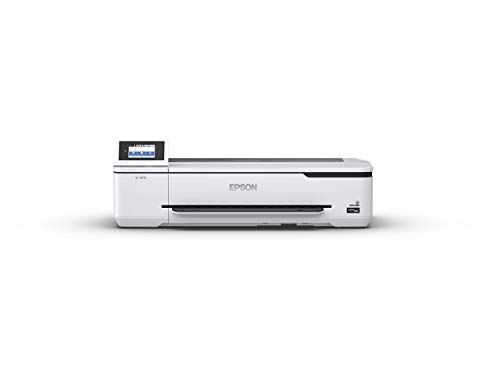
2. Epson SureColor T3170 — Best for Speed and Desktop Convenience
If turnaround speed is your primary concern, the Epson SureColor T3170 is the plotter to put on your shortlist. Epson's PrecisionCore printhead technology allows this machine to produce an accurate A1 or D-size print in approximately 34 seconds, which is fast enough to keep up with the pace of a busy design studio running through revision after revision. The 4.3-inch color LCD touchscreen makes navigating print settings, checking ink levels, and managing jobs intuitive even for staff members who are not particularly tech-savvy.
What sets the T3170 apart from the competition is its ultra-compact footprint. Epson designed this as a true desktop plotter, and it genuinely fits on a standard office desk without dominating the entire surface. That matters in smaller architectural firms where floor space is already consumed by model-building supplies, sample libraries, and rolls of trace paper. Despite its compact dimensions, the T3170 accepts 24-inch roll media and delivers the same D-size output as plotters twice its physical size. The all-pigment ink system produces prints that resist fading and water damage, which is critical when your drawings end up on a construction site exposed to the elements.
Wireless connectivity works reliably across both Windows and Mac environments, and Epson's driver suite includes solid support for AutoCAD and Revit output. The optional stand lets you elevate the printer to a more ergonomic height if desk placement is not practical, though the stand is an additional purchase. For architects who print D-size sheets regularly and value speed above all else, the T3170 is the strongest contender in this lineup.
Pros:
- Blazing-fast 34-second D-size prints via PrecisionCore technology
- Smallest desktop footprint among 24-inch plotters currently available
- All-pigment inks deliver durable, water-resistant output suitable for field use
- Intuitive 4.3-inch touchscreen simplifies daily operation
Cons:
- Optional stand sold separately, which most users will want for ergonomic reasons
- Ink cartridge replacement costs are higher than some competitors in this bracket
3. Canon imagePROGRAF TC-21 — Best Value Large-Format Plotter
Canon's imagePROGRAF TC-21 enters the 2026 large-format market with a compelling value proposition: it ships with 280 ml of ink out of the box — 70 ml per color — which Canon claims is the most generous starter ink supply in its class. That alone can save you a meaningful amount during the first few months of ownership, when most competing plotters force you to buy full-size cartridges almost immediately after the included starter inks run dry. For a solo practitioner or small firm watching expenses carefully, this detail genuinely moves the needle on total first-year cost.
The TC-21 is a 4-color ink printer that handles both roll media and cut sheets through its automatic sheet feeder, giving you the flexibility to toggle between full 24-inch architectural sheets and smaller format proofs without manually swapping media. Text and line quality are crisp enough for construction documents and permit sets, and the vibrant color output holds up well for presentation boards and client-facing renderings. Canon's print driver integrates smoothly with standard CAD software, and the setup process is refreshingly straightforward compared to some of the more enterprise-oriented Canon plotters.
Where the TC-21 sits relative to the HP T210 and Epson T3170 comes down to priorities. It does not match the T3170's raw speed, and its 4-color ink gamut is narrower than the Canon TM-240's 5-color system. But if you want a reliable 24-inch plotter that delivers solid architectural output without punishing you on consumable costs from day one, the TC-21 is the smartest entry point in Canon's current lineup.
Pros:
- Ships with 280 ml of ink — the most generous starter supply in its class
- Automatic sheet feeder handles both roll and cut sheet media seamlessly
- Clean, crisp line output suitable for architectural drawings and permit sets
- Competitive price point for a branded 24-inch large-format plotter
Cons:
- 4-color ink system limits the color gamut compared to 5- or 6-color plotters
- Print speed trails behind the Epson T3170 on D-size output
4. Canon imagePROGRAF TM-240 — Best for Color Accuracy and Outdoor Durability
The Canon imagePROGRAF TM-240 is the premium pick in this guide for architects who demand top-tier color accuracy and prints that can survive outdoor job site conditions without degrading. Canon equipped this model with the L-COA PRO II processor, which delivers approximately 30 percent faster output than previous TM-series models — you are looking at speeds up to 3.2 pages per minute for a standard 24×36-inch sheet. That processor also handles color management calculations in real time, ensuring consistent output across long print runs when you are producing a full set of presentation boards for a client meeting.
The real differentiator here is the 5-color pigment ink system with a newly formulated magenta cartridge that expands the reproducible color gamut beyond what any 4-color plotter can achieve. The high-density PF-06 printhead pushes 15,360 nozzles firing 5-picoliter droplets, which translates to a maximum resolution of 2400×1200 dpi. Lines are sharp, text is perfectly defined at even the smallest point sizes, and color gradients render with a smoothness that you will appreciate when printing material sample boards or landscape renderings. Canon's UV and water-resistant ink formulation means your site plans and construction documents hold up under rain, direct sunlight, and the general abuse that field conditions inflict on printed materials.
This is also the plotter to choose if you produce signage or outdoor displays for project sites, open houses, or community presentations. Pair the TM-240 with Canon's water-resistant media and the resulting prints are genuinely weatherproof. The price premium over the TC-21 is justified if color fidelity and environmental durability are non-negotiable requirements in your practice. Architects who also work in large-format photography and visual documentation will find the TM-240's color reproduction particularly satisfying.
Pros:
- 5-color pigment ink system with enhanced magenta delivers superior color accuracy
- L-COA PRO II processor provides 30% faster output than previous models
- UV and water-resistant inks produce prints rated for outdoor and job site conditions
- 15,360-nozzle printhead at 2400×1200 dpi ensures razor-sharp lines and text
Cons:
- Higher price point than the TC-21 and most competing 24-inch plotters
- 5-color ink system means more cartridges to manage and replace over time
5. Epson WorkForce Pro WF-7840 — Best Wide-Format All-in-One
Not every architect needs a dedicated plotter, and the Epson WorkForce Pro WF-7840 represents the strongest argument for a wide-format all-in-one that covers both your architectural printing needs and daily office tasks in a single machine. This printer handles output up to 13×19 inches — true tabloid-extra size — while also providing copy, scan, and fax capabilities that eliminate the need for a separate office multifunction device. The 500-sheet paper capacity means you are not constantly refilling trays during busy production weeks, and automatic two-sided printing works on paper sizes all the way up to 13×19.
Epson's PrecisionCore Heat-Free Technology is worth understanding because it directly affects print quality and longevity. Unlike thermal inkjet systems that heat ink to create droplets, PrecisionCore uses mechanical pressure, which means more consistent droplet size and placement over the printhead's lifetime. The DURABrite Ultra pigment inks dry quickly and resist smudging, which is practical when you are handling prints immediately after output or stacking sheets for a presentation package. The 50-page automatic document feeder makes scanning existing drawings and documents efficient, particularly when you are digitizing hand sketches or archiving older paper records.
Wireless connectivity supports 802.11ac for fast, reliable throughput, and Epson's mobile printing apps let you send jobs from your phone or tablet when you are away from your desk. The WF-7840 is not going to replace a 24-inch plotter for full architectural sheet sets, but it handles 11×17 prints with confidence and serves as an outstanding general-purpose office workhorse that just happens to go wider than standard printers. For firms that print tabloid-size drawings occasionally rather than daily, this is the most cost-effective path.
Pros:
- True all-in-one with print, copy, scan, and fax up to 13×19-inch output
- 500-sheet capacity and auto-duplex reduce paper handling interruptions
- PrecisionCore Heat-Free Technology ensures consistent quality over the printhead's lifetime
- Fast-drying DURABrite Ultra pigment inks resist smudging immediately after printing
Cons:
- Maximum 13×19-inch output does not accommodate full D-size architectural sheets
- Color accuracy is office-grade rather than design-studio caliber
6. Epson EcoTank Pro ET-16650 — Best for High-Volume, Low-Cost Printing
The Epson EcoTank Pro ET-16650 takes a fundamentally different approach to ink economics, and for high-volume architectural offices it can save you a staggering amount over the printer's lifetime. Instead of traditional cartridges, the ET-16650 uses refillable supertanks that you top off with low-cost ink bottles. Epson estimates savings of up to 80 percent compared to standard-capacity color laser toner cartridges, bringing your per-page color cost down to roughly 2 cents versus 14 cents with cartridge-based systems. When you are running through hundreds of tabloid-size progress prints, markups, and client review copies each month, that cost difference compounds rapidly.
This is a full-featured wide-format all-in-one that prints up to 13×19 inches and includes scanning, copying, faxing, and Ethernet connectivity alongside standard wireless. The pigment-based ink system produces sharp text and clean lines that hold up well for architectural drawings at the tabloid scale, and the built-in automatic document feeder handles multi-page scan jobs without manual intervention. The ET-16650 also supports borderless printing on certain media sizes, which is useful for presentation boards and client deliverables where you want edge-to-edge coverage.
The upfront purchase price of the ET-16650 is higher than the WF-7840, but the break-even point arrives quickly if your monthly print volume exceeds a few hundred pages. For architecture firms that treat printing as a utility rather than an occasional task, the supertank model delivers the lowest total cost of ownership of any printer in this roundup. The trade-off is that you are limited to 13×19-inch output, so this works best as a high-volume office printer alongside a dedicated plotter for full-size sheets.
Pros:
- Supertank refill system cuts per-page ink costs by up to 80 percent versus cartridges
- Full all-in-one functionality with print, copy, scan, fax, and Ethernet connectivity
- Pigment inks produce durable, smudge-resistant output on plain and coated media
- Ideal for offices with high monthly print volumes where cost per page is the priority
Cons:
- Higher upfront purchase price compared to cartridge-based alternatives
- Maximum 13×19-inch output means you still need a plotter for full architectural sheets
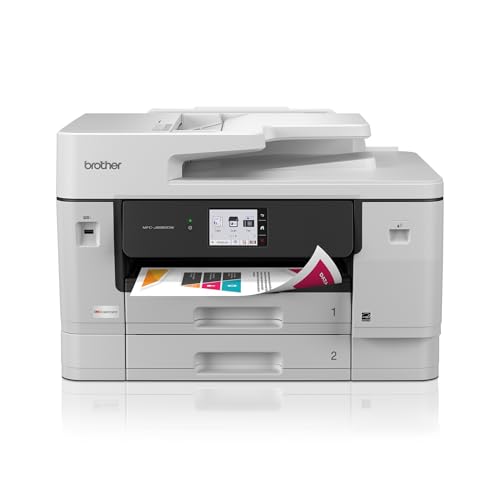
7. Brother INKvestment 6960 — Best Budget 11×17 All-in-One
The Brother INKvestment 6960 is the most affordable path to 11×17 printing in this guide, and it packs in a surprising number of professional features at its price point. You get print, copy, scan, and fax capabilities on paper up to 11×17 inches, powered by Brother's MAXIDRIVE Technology that pushes print speeds up to 31 pages per minute in black and 30 pages per minute in color. Those are fast numbers for an inkjet all-in-one, and they make the 6960 viable as a primary office printer rather than a slow specialty device you only use for occasional wide-format output.
Paper handling is genuinely impressive for this price class. The 6960 offers a 500-sheet total capacity across two trays plus a 100-sheet multipurpose tray, which means you can load letter paper in one tray, tabloid in another, and specialty media in the multipurpose tray without swapping stock between jobs. The single-pass duplex automatic document feeder scans both sides of a page in one pass, cutting your scan and copy times in half compared to units that flip the page mechanically. Automatic duplex printing works on paper sizes up to 11×17, which saves significant paper when you are printing double-sided preliminary drawings or specification documents.
The INKvestment cartridge system ships with a high-yield black cartridge rated at 1,800 pages and standard-yield color cartridges at 750 pages each, so you get reasonable runway before your first replacement purchase. The 3.5-inch color touchscreen is responsive and well-organized, and wireless connectivity plus Ethernet give you flexible network integration options. If your architectural practice primarily needs 11×17 output rather than full D-size sheets, the Brother 6960 delivers that capability at a fraction of what the large-format plotters cost. This is also a strong choice as a secondary printer paired with a dedicated plotter for everyday office tasks. For visual professionals looking to expand their toolkit, our roundup of magnetic drawing boards covers another useful tool for sketching and ideation.
Pros:
- Most affordable 11×17 all-in-one with print, copy, scan, and fax
- Fast output at 31 ppm black and 30 ppm color via MAXIDRIVE Technology
- 500-sheet capacity across dual trays plus a 100-sheet multipurpose tray
- Single-pass duplex ADF scans both sides without flipping pages mechanically
Cons:
- Maximum 11×17-inch output is smaller than the 13×19 capability of competing all-in-ones
- Color reproduction is functional but does not match dedicated plotters for design work
Key Features to Consider When Choosing a Printer for Architecture
Print Size and Format Compatibility
The single most important decision is whether you need true large-format output (24 inches wide for D-size and larger sheets) or whether wide-format tabloid printing (11×17 or 13×19 inches) covers your requirements. Architects who regularly produce full construction document sets, site plans, or presentation boards at architectural scale need a 24-inch plotter like the HP T210, Epson T3170, or one of the Canon imagePROGRAF models. If your large-format needs are occasional and you primarily work at tabloid scale for preliminary drawings and in-house reviews, a wide-format all-in-one saves money and desk space while still delivering professional results. Consider your workflow honestly — outsourcing a handful of D-size prints per month to a local print shop may cost less than maintaining a dedicated plotter if your volume does not justify the investment.
Line Quality and Resolution
Architectural drawings live and die by line quality. Hairline vectors, dimension text at small point sizes, and hatching patterns all need to reproduce cleanly without feathering, banding, or broken segments. Look for printers with minimum 1200 dpi resolution and pigment-based inks, which produce sharper lines than dye-based alternatives. The Canon TM-240's 2400×1200 dpi resolution and 5-picoliter droplet size represent the gold standard in this roundup for line precision. Plotters with dedicated matte black ink channels tend to produce denser, more defined linework on bond and vellum media than those using composite black from CMYK mixing, according to the technical printing standards documented by industry sources.
Ink System and Running Costs
The upfront price of a printer tells only part of the story — ink and media costs over the first two to three years often exceed the purchase price itself. Cartridge-based systems like those in the HP T210 and Canon plotters offer convenience and straightforward maintenance, but the per-page cost is higher than supertank alternatives. The Epson EcoTank ET-16650's refillable tank system dramatically reduces per-page costs for high-volume offices. Brother's INKvestment system falls somewhere in between, shipping with high-yield cartridges that extend the interval between replacements. Calculate your estimated monthly page volume and multiply by each printer's per-page cost to get a realistic picture of total ownership expense before you decide.
Connectivity and Workflow Integration
Modern architectural practices rely on seamless digital workflows, and your printer needs to integrate without friction. Every printer in this guide supports wireless connectivity, but the quality of the driver software and its compatibility with your CAD platform matters just as much as the wireless hardware. Verify that the printer you choose has tested, certified drivers for AutoCAD, Revit, ArchiCAD, or whichever design software your firm standardizes on. Ethernet connectivity is worth prioritizing in multi-user offices where wireless bandwidth is shared with other devices, as a wired connection ensures consistent throughput for large print files. Cloud printing capabilities and mobile apps add flexibility for principals and project managers who need to send jobs from the field.
What People Ask
Can an 11×17 printer handle full architectural drawing sets?
An 11×17 printer handles half-size architectural sheets, which are common for preliminary reviews, field sets, and permit submittals in many jurisdictions. Full-size D-size sheets (24×36 inches) require a large-format plotter. Many firms use an 11×17 all-in-one for everyday tasks and outsource or use a plotter for full-size sets when needed.
What is the difference between a plotter and a wide-format printer?
A plotter is specifically designed for large-format output, typically accepting roll media 24 inches wide or larger, and optimized for precise vector line work. A wide-format printer generally refers to inkjet all-in-ones that print larger than standard letter size — up to 13×19 inches — but are built more like conventional office printers with scanning and copying features included.
Do architects need pigment or dye-based ink for their printers?
Pigment ink is strongly preferred for architectural use. Pigment inks produce sharper lines, resist water and UV fading, and maintain legibility on construction sites where prints face environmental exposure. Dye inks deliver slightly more vibrant colors for photographic work but smudge more easily and fade faster under sunlight or moisture.
How much does it cost per page to run a large-format plotter?
Cost per page varies significantly by printer and media type, but expect roughly $0.50 to $2.00 per D-size sheet on a 24-inch plotter using standard bond paper and accounting for ink consumption. Glossy or coated media for presentation-quality output increases costs further. Supertank systems like the Epson EcoTank reduce per-page ink costs substantially for smaller format sizes.
Is wireless printing reliable enough for large CAD files?
Modern 802.11ac wireless connections handle large CAD files without issues for most users, though very large multi-layer files with embedded images can experience delays. For the most consistent performance in a multi-user office environment, Ethernet connectivity eliminates wireless congestion entirely and provides the most reliable throughput for oversized print jobs.
Should I buy one large-format plotter or a plotter plus a smaller all-in-one?
Most architectural firms benefit from a two-printer setup: a dedicated plotter for full-size sheets and a wide-format all-in-one for everyday 11×17 prints, scanning, and copying. Running small everyday jobs through an expensive plotter wastes ink and accelerates printhead wear. The Brother 6960 or Epson WF-7840 paired with any of the 24-inch plotters in this guide provides the most versatile and cost-effective combination.
Buy on Walmart
- HP DesignJet T210 Large Format 24-inch Color Plotter Printer — Walmart Link
- Epson SureColor T3170 24-Inch Desktop Wireless Poster CAD Pl — Walmart Link
- Canon imagePROGRAF TC-21 24" - Large Format Printer, Poster — Walmart Link
- Canon imagePROGRAF TM-240 24" Large Format Printer — Walmart Link
- Epson Workforce Pro WF-7840 Wireless All-in-One Wide-Format — Walmart Link
- Epson EcoTank Pro ET-16650 Wireless Wide-Format Color All-in — Walmart Link
- Brother INKvestment 6960 Wireless Color Inkjet All-in-One Pr — Walmart Link
Buy on eBay
- HP DesignJet T210 Large Format 24-inch Color Plotter Printer — eBay Link
- Epson SureColor T3170 24-Inch Desktop Wireless Poster CAD Pl — eBay Link
- Canon imagePROGRAF TC-21 24" - Large Format Printer, Poster — eBay Link
- Canon imagePROGRAF TM-240 24" Large Format Printer — eBay Link
- Epson Workforce Pro WF-7840 Wireless All-in-One Wide-Format — eBay Link
- Epson EcoTank Pro ET-16650 Wireless Wide-Format Color All-in — eBay Link
- Brother INKvestment 6960 Wireless Color Inkjet All-in-One Pr — eBay Link
Key Takeaways
- The HP DesignJet T210 is the best overall 24-inch plotter for architects who need precise CAD line quality and flexible media handling at a reasonable price.
- The Canon imagePROGRAF TM-240 justifies its premium with a 5-color ink system, 2400×1200 dpi resolution, and UV/water-resistant prints built for outdoor job site conditions.
- For offices that print heavily at tabloid size, the Epson EcoTank Pro ET-16650's supertank system slashes per-page costs by up to 80 percent versus cartridge-based printers.
- The Brother INKvestment 6960 is the smartest budget entry point for 11×17 all-in-one capability, delivering fast speeds and generous paper capacity at the lowest price in this roundup.


About David Fox
David Fox is an artist and writer whose work spans painting, photography, and art criticism. He created davidcharlesfox.com as a platform for exploring the history, theory, and practice of visual art — covering everything from Renaissance masters and modernist movements to contemporary works and the cultural context that shapes how art is made and received. At the site, he covers art history, architecture, anime art and culture, collecting guidance, and profiles of influential artists across centuries and movements.
Now get FREE Gifts. Or latest Free phones here.
Disable Ad block to reveal all the secrets. Once done, hit a button below