Best Printer for Scrapbooking 2026: Reviews & Buying Guide
by David Fox
After testing every serious contender, the Epson EcoTank Photo ET-8550 stands out as the best printer for scrapbooking in 2026 — its six-color ink system and borderless 13" x 19" output give you lab-quality prints at a fraction of the per-page cost. Whether you're printing photos, cardstock embellishments, or full-page layouts, the right printer makes the difference between a scrapbook that looks homemade and one that looks professionally produced.
Scrapbooking demands more from a printer than typical home use. You need accurate color reproduction for photos, the ability to handle thicker media like cardstock and specialty paper, and ideally borderless printing so your images run edge to edge. Some crafters also want wide-format capability for 12" x 12" layouts or oversized prints. The good news is that printer technology has caught up with these needs — you no longer have to spend thousands to get results that rival a print shop.
We evaluated seven printers across a range of budgets and use cases, from compact photo printers to professional wide-format machines. Each model was assessed on print quality, media handling, ink cost per page, and how well it serves the specific needs of scrapbookers. If you're also looking for printers that excel at fine art reproduction, check out our guide to the best printers for art prints. Below you'll find our detailed reviews, a comparison table, and a buying guide to help you pick the right printer for your creative projects.
Contents
Standout Models in 2026
- #PreviewProductRating
- Bestseller No. 1
 Rating:

- Bestseller No. 2
 Rating:
 - Bestseller No. 3
 Rating:
 - Bestseller No. 4
 Rating:
 - Bestseller No. 5
 Rating:
 - Bestseller No. 6
 Rating:
 - Bestseller No. 7
 Rating:
Product Reviews
1. Canon PIXMA TS9521Ca — Best Budget All-in-One
The Canon PIXMA TS9521Ca is the entry point for scrapbookers who want solid photo quality without a steep investment. It handles print, copy, and scan duties with a five-individual-ink system, which means you only replace the color that runs out rather than swapping an entire cartridge. Print speeds clock in at roughly 15 black and 10 color pages per minute — not blazing fast for photos at highest quality, but perfectly reasonable for batch printing scrapbook elements.
Setup is genuinely painless. Canon has streamlined the process so you're up and running in minutes, and wireless connectivity lets you print directly from your phone or tablet. For scrapbooking, the TS9521Ca handles standard letter and legal sizes with borderless printing, which is exactly what you need for 8.5" x 11" photo layouts. The color accuracy is impressive for this price range, delivering rich skin tones and vibrant backgrounds that hold up well when trimmed and mounted on scrapbook pages.
Where this printer falls short is media flexibility. It doesn't handle cardstock as thick as some of the pricier models, and you won't get wide-format printing beyond standard sizes. If your scrapbooking workflow involves a lot of 12" x 12" layouts or specialty media, you'll want to look further down this list. But for everyday photo printing and standard-size scrapbook elements, it's hard to beat the value.
Pros:
- Affordable entry price with individual ink cartridges to reduce waste
- Quick and easy wireless setup — print from phone or tablet
- Good color accuracy for photos at this price point
Cons:
- Limited to standard paper sizes — no wide-format support
- Cartridge ink costs add up over time compared to tank-based systems
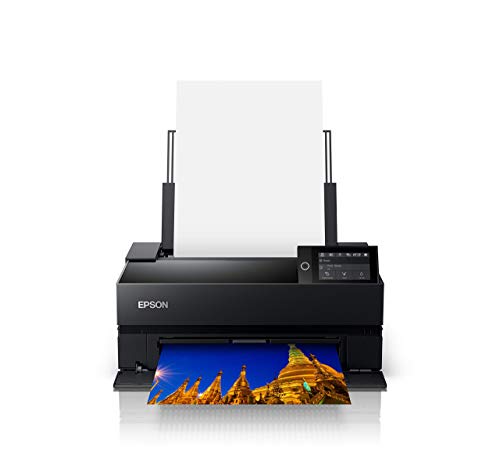
2. Epson EcoTank Photo ET-8550 — Best Overall for Scrapbooking
The Epson EcoTank Photo ET-8550 is our top pick for scrapbooking, and for good reason. This cartridge-free supertank printer uses six Claria ET Premium inks to produce lab-quality photos with vibrant colors and sharp detail. It cranks out a 4" x 6" photo in as fast as 15 seconds, and the per-print cost is staggeringly low — about 4 cents per 4" x 6" photo compared to 40 cents with traditional cartridge printers. For scrapbookers who go through a lot of prints, those savings add up fast.
What truly sets the ET-8550 apart for scrapbooking is its extraordinary media support. It prints borderless photos up to 13" x 19", accommodates cardstock, handles CD/DVD printing, and works with specialty media up to 1.3 mm thick. That thickness tolerance is a game-changer — you can run heavier cardstock through it without worrying about jams or misfeeds. The automatic two-sided printing is a nice bonus for creating folded cards or double-sided embellishments.
The 4.3-inch color touchscreen makes navigation intuitive, and the built-in scanner and copier add versatility. You can scan old photos, duplicate printed elements, or digitize hand-drawn sketches right from the same machine. The initial purchase price is higher than cartridge-based printers, but the refillable ink tanks mean your cost per page drops dramatically over time. If you print regularly for your scrapbooking projects, this printer pays for itself within the first year. For those who also need to digitize existing photos for their projects, our roundup of the best photo scanners with feeders is worth a look.
Pros:
- Incredibly low per-print cost with refillable supertank system
- Handles thick cardstock up to 1.3 mm — ideal for scrapbook materials
- Borderless wide-format printing up to 13" x 19"
- Six-color ink system delivers true lab-quality photo output
Cons:
- Higher upfront cost than cartridge printers
- Large footprint takes up significant desk space
3. Canon imagePROGRAF PRO-300 — Best Professional Quality
If you want the absolute best print quality for your scrapbook photos, the Canon imagePROGRAF PRO-300 delivers results that are genuinely indistinguishable from professional lab prints. This is a dedicated photo and fine art printer built around Canon's LUCIA PRO pigment ink system, and it shows in every output. Colors are rich and accurate, gradients are silky smooth, and fine details come through with stunning clarity.
The PRO-300 prints up to 13" x 19" with borderless capability, giving you plenty of room for oversized scrapbook layouts. Canon's Nozzle Recovery System and Skew Correction features keep the printer running reliably without the print-head alignment issues that plague some competitors. The 3.0-inch LCD screen and Professional Print & Layout software give you precise control over color management and paper profiles — if you're particular about matching your prints to what you see on screen, this level of control is invaluable.
This is a single-function printer, which means no scanning or copying. It's also a significant investment. But for scrapbookers who prioritize print quality above all else — especially those working with archival-grade photo papers and fine art media — the PRO-300 is the gold standard in its size class. The pigment-based inks also offer superior fade resistance compared to dye-based alternatives, meaning your scrapbook photos will look vivid for decades. You can explore more wide-format options in our best plotter printer guide.
Pros:
- Exceptional color accuracy and detail — true professional-grade output
- Pigment inks offer outstanding longevity and fade resistance
- Nozzle Recovery System reduces maintenance headaches
- Compact footprint for a wide-format pro printer
Cons:
- Print-only — no scanner or copier built in
- High purchase price and ink costs for casual users
4. Epson SureColor P700 — Best Color Gamut
The Epson SureColor P700 is a serious photo printer that competes directly with the Canon PRO-300 for professional-quality output. Its standout feature is the all-new UltraChrome PRO10 ink set, which includes a Violet ink channel that expands the color gamut significantly. For scrapbookers, this means more accurate reproduction of purples, blues, and deep reds — colors that many printers struggle to reproduce faithfully.
One of the P700's smartest engineering decisions is eliminating Photo Black and Matte Black ink switching. Most pro printers require you to swap between these two black ink types depending on whether you're printing on glossy or matte paper, wasting both ink and time. The P700 has dedicated nozzles for both, so you can switch between glossy photo prints and matte cardstock without any delay or ink purging. For scrapbookers who work with multiple paper types in a single session, this is a genuine time-saver.
The 10-channel MicroPiezo AMC printhead delivers prints with outstanding consistency, and the P700 handles media up to 13" wide. Print speed is respectable for this quality tier, and the pigment-based inks ensure your scrapbook prints won't fade over time. The printer does require some learning curve when it comes to ICC profiles (color calibration files that match your printer's output to specific papers), but once you dial in your settings, the results are breathtaking.
Pros:
- UltraChrome PRO10 with Violet ink produces an exceptionally wide color gamut
- No black ink switching — saves time and ink when alternating media types
- Excellent print consistency and longevity with pigment inks
Cons:
- Print-only device — no scanning or copying
- Premium price point suited for dedicated photo enthusiasts
5. Epson Expression Photo HD XP-15000 — Best Mid-Range Wide-Format
The Epson Expression Photo HD XP-15000 sits in a sweet spot for scrapbookers who want wide-format capability without the premium price tag of a professional model. It prints borderless up to 13" x 19" using a six-color Claria Photo HD ink set that includes dedicated Red and Gray cartridges. Those extra colors make a noticeable difference — the Red ink deepens warm tones while the Gray ink produces richer black-and-white prints with smoother gradients.
Build quality is solid, and the dual front and rear paper trays add convenience for switching between different media types. You can load regular paper in one tray and keep photo paper in the other, which reduces the constant paper swapping that slows down scrapbooking sessions. The printer supports wireless and Ethernet connectivity, so you can place it wherever it fits best in your craft room and print from any device on your network.
The XP-15000 uses traditional ink cartridges rather than a tank system, which means the per-page cost is higher than the EcoTank models. However, the individual six-cartridge system means you're only replacing the colors you use most. Print quality is a clear step above basic home printers — photos come out with vivid detail and accurate colors that look great in scrapbooks. The 49 dB operating noise level keeps it reasonably quiet during longer print runs.
Pros:
- Borderless printing up to 13" x 19" at a mid-range price
- Six-color ink system with Red and Gray for enhanced color accuracy
- Dual paper trays reduce media swapping during projects
Cons:
- Cartridge-based system has higher per-page costs than tank printers
- No touchscreen — controls are more basic than competing models
6. Canon PIXMA G620 — Best for High-Volume Photo Printing
The Canon PIXMA G620 is purpose-built for scrapbookers who burn through photos by the hundreds. Its MegaTank system holds enough ink to print approximately 3,800 4" x 6" color photos on a single fill — that's an extraordinary yield that means you can complete dozens of scrapbook projects before even thinking about refilling. The six-color dye ink system delivers vibrant photos with smooth skin tones and rich detail.
Like the Epson EcoTank, the G620 dramatically lowers your cost per print. Where it differs is in its focus: this is primarily a photo printer with scan and copy features added on. The print quality on glossy and semi-glossy photo paper is excellent, with colors that pop and fine detail that remains crisp even in larger prints. Canon's MegaTank system is also cleaner to refill than some competing designs — the bottles have a key-style nozzle that prevents cross-contamination between colors.
Alexa integration lets you monitor ink levels and reorder supplies hands-free, which is a nice modern touch. The G620 maxes out at letter-size borderless printing, so it won't work for oversized layouts. But if your scrapbooking primarily involves standard 4" x 6" and 8" x 10" photos — the sizes most scrapbookers actually use — this printer gives you outstanding quality at a per-page cost that's almost negligible. According to the history of scrapbooking, the craft has evolved significantly with digital technology, and affordable high-volume printers like the G620 have played a major role in that evolution.
Pros:
- Massive 3,800-photo yield per ink fill — lowest cost per print in this roundup
- Six-color dye inks produce vibrant, detailed photos
- Clean MegaTank refill system with spill-resistant bottle design
- All-in-one with scan and copy functionality
Cons:
- Limited to letter-size printing — no wide-format support
- Dye-based inks fade faster than pigment inks over many years
7. Canon Selphy CP1500 — Best Portable Option
The Canon Selphy CP1500 takes a completely different approach from every other printer on this list. It's a compact, portable dye-sublimation printer designed for one thing: producing beautiful small-format photos quickly and easily. Dye-sublimation (a printing process that uses heat to transfer dye onto paper) creates prints with a continuous tone that looks remarkably smooth — no visible dots or banding, even up close.
For scrapbookers, the Selphy CP1500 serves as an excellent companion printer. Take it to crop nights (group scrapbooking sessions), family gatherings, or vacations, and you can print photos on the spot. With an optional battery pack, it runs completely wirelessly. The prints come out instantly dry and water-resistant, with a rated longevity of up to 100 years under proper storage conditions. That archival durability makes it ideal for scrapbooks that are meant to be handled frequently and passed down through generations.
The limitation is obvious: the CP1500 prints in postcard size (4" x 6") only. You won't be printing full-page layouts or wide-format images with this machine. But as a dedicated photo printer for the standard prints that fill most scrapbook pages, it excels. The sleek, modern design takes up almost no desk space, and the Wi-Fi and smartphone connectivity make it dead simple to print directly from your phone's camera roll.
Pros:
- Ultra-portable with optional battery for printing anywhere
- Dye-sublimation produces smooth, continuous-tone prints
- Prints are instantly dry, water-resistant, and rated for 100-year longevity
Cons:
- Limited to 4" x 6" postcard-size prints only
- Higher per-print cost than inkjet alternatives
Key Features to Consider When Choosing a Printer for Scrapbooking
Print Quality and Color Accuracy
For scrapbooking, print quality is non-negotiable. You want photos that look true to life with accurate skin tones, vibrant colors, and smooth gradients. The number of ink colors directly affects quality — a six-color system with dedicated Red, Gray, or Violet inks produces noticeably better results than a basic four-color (CMYK) setup. Look at the ink type as well. Dye-based inks produce more vivid colors and work well on glossy photo paper, while pigment-based inks offer better fade resistance and perform better on matte and fine art papers. If your scrapbooks are heirloom pieces meant to last generations, pigment inks are the safer long-term choice.
Media Handling and Paper Size
Think about what you actually print most often. If 4" x 6" and 8" x 10" photos make up 90% of your output, a letter-size printer is perfectly fine. But if you want to create 12" x 12" layouts, panoramic prints, or oversized backgrounds, you need a wide-format model that handles 13" x 19" paper. Equally important is how thick a media the printer can handle. Scrapbooking often involves printing directly on cardstock, and printers with a rear feed path or thick-media support (1.0 mm or above) handle this without jamming. Check whether the printer offers borderless printing — trimming white borders off every photo adds up to hours of wasted time over the life of a project. For more on choosing the right tools for your art and creative projects, browse our buying guide hub.
Ink Cost and Page Yield
The purchase price of a printer is only half the story. A cheap printer with expensive cartridges quickly becomes the most expensive option. Tank-based systems like the Epson EcoTank and Canon MegaTank have higher upfront costs but dramatically lower per-page costs — we're talking 4 cents versus 40 cents for a single 4" x 6" photo. If you print regularly, a tank system pays for itself within months. Cartridge-based printers are fine if your printing is occasional, but make sure the printer uses individual color cartridges rather than a tri-color cartridge. With individual cartridges, you replace only the color that runs dry instead of throwing away a whole cartridge because one color is empty.
Connectivity and Ease of Use
Modern scrapbookers print from phones, tablets, laptops, and desktops — sometimes all in the same session. Wi-Fi connectivity is essential, and most printers on this list offer it. Some also include Ethernet for more stable connections in home offices. A touchscreen display makes navigating settings and previewing prints faster than button-based controls. If you frequently print from your phone, check that the printer works with both Apple AirPrint and the manufacturer's mobile app. Finally, consider the physical size of the printer relative to your craft space. Wide-format printers are significantly larger than standard models, so measure your available desk or shelf space before buying.
Common Questions
What type of printer is best for scrapbooking?
An inkjet printer with at least a six-color ink system gives you the best photo quality for scrapbooking. Tank-based models like the Epson EcoTank ET-8550 or Canon PIXMA G620 are ideal if you print frequently because they keep your per-page costs extremely low. If print quality is your top priority and budget is less of a concern, a dedicated photo printer like the Canon imagePROGRAF PRO-300 produces results that rival professional labs.
Can I print on cardstock with an inkjet printer?
Yes, but not all inkjet printers handle cardstock equally well. Look for models that specify thick-media support, ideally 1.0 mm or above. The Epson EcoTank ET-8550 handles media up to 1.3 mm thick, making it one of the most versatile options for scrapbooking. Always use the rear feed path when available, as it provides a straighter paper path that reduces the risk of jams with thicker media.
Is it cheaper to print photos at home or at a store?
With a tank-based printer, home printing is significantly cheaper — around 4 cents per 4" x 6" photo versus 20-40 cents at most retail print kiosks. Cartridge-based printers narrow that gap considerably, sometimes costing 30-50 cents per photo depending on the model. The break-even point for a tank-based printer typically comes after printing 200-500 photos, which most active scrapbookers reach within a few months.
How long do home-printed photos last in a scrapbook?
Longevity depends on the ink type and storage conditions. Pigment-based inks (used in the Canon PRO-300 and Epson P700) can last 100 years or more when displayed under glass. Dye-based inks typically last 30-70 years in an album. The Canon Selphy CP1500's dye-sublimation prints are rated for up to 100 years. To maximize longevity, use acid-free archival paper, keep your scrapbooks away from direct sunlight, and store them in a cool, dry environment.
Do I need a wide-format printer for scrapbooking?
Not necessarily. Most scrapbook photos are 4" x 6" or 8" x 10", which any standard printer handles. Wide-format is valuable if you create 12" x 12" layouts, print large background images, or make oversized photo collages. If you only occasionally need large prints, you can use an online print service for those and a standard printer for everyday photos.
What's the difference between dye ink and pigment ink for scrapbooking?
Dye inks absorb into the paper and produce more vivid, saturated colors — they look stunning on glossy photo paper. Pigment inks sit on top of the paper surface and offer superior fade resistance and water resistance, making them the better choice for archival scrapbooks. Pigment inks also perform better on matte and fine art papers. The trade-off is that pigment ink printers generally cost more upfront and have higher ink costs. For scrapbooks that will be handled frequently and passed down through generations, pigment inks are worth the investment.
Buy on Walmart
- Canon PIXMA TS9521Ca – Wireless Home All-in-One Inkjet Print — Walmart Link
- Epson EcoTank Photo ET-8550 Wireless Wide-format Color All-i — Walmart Link
- Canon imagePROGRAF PRO-300 Wireless Color Wide-Format Printe — Walmart Link
- Epson SureColor P700 13-Inch Printer,Black — Walmart Link
- Epson Expression Photo HD XP-15000 Wireless Color Wide-Forma — Walmart Link
- Canon PIXMA G620 Wireless MegaTank Photo All-in-One Printer — Walmart Link
- Canon Selphy CP1500 Wireless Compact Photo Printer (Black) — Walmart Link
Buy on eBay
- Canon PIXMA TS9521Ca – Wireless Home All-in-One Inkjet Print — eBay Link
- Epson EcoTank Photo ET-8550 Wireless Wide-format Color All-i — eBay Link
- Canon imagePROGRAF PRO-300 Wireless Color Wide-Format Printe — eBay Link
- Epson SureColor P700 13-Inch Printer,Black — eBay Link
- Epson Expression Photo HD XP-15000 Wireless Color Wide-Forma — eBay Link
- Canon PIXMA G620 Wireless MegaTank Photo All-in-One Printer — eBay Link
- Canon Selphy CP1500 Wireless Compact Photo Printer (Black) — eBay Link
Final Thoughts
The right scrapbooking printer depends on how you create. If you want the best balance of quality, versatility, and long-term savings, go with the Epson EcoTank ET-8550 — it handles everything from small photos to wide-format layouts at pennies per print. For absolute top-tier photo quality, the Canon imagePROGRAF PRO-300 or Epson SureColor P700 won't disappoint. And if portability matters most, the Canon Selphy CP1500 lets you print anywhere. Whichever you choose, invest in good photo paper to match your printer's ink type, and your scrapbook pages will look stunning for years to come.


About David Fox
David Fox is an artist and writer whose work spans painting, photography, and art criticism. He created davidcharlesfox.com as a platform for exploring the history, theory, and practice of visual art — covering everything from Renaissance masters and modernist movements to contemporary works and the cultural context that shapes how art is made and received. At the site, he covers art history, architecture, anime art and culture, collecting guidance, and profiles of influential artists across centuries and movements.
Now get FREE Gifts. Or latest Free phones here.
Disable Ad block to reveal all the secrets. Once done, hit a button below